

 Loading...



Play Run 3 online for free and jump into a fast space tunnel runner where gravity can flip in a second. In this browser game, the floor can become the wall, and the wall can become your new runway. That is why Run 3 feels like an arcade challenge and a tiny puzzle at the same time. You do not need downloads. You can start playing right now on our page: https://swing-monkey.com/game/run-3.
Run 3 is easy to understand, but it stays exciting because every tunnel asks a new question. Do you take the safe path and finish the level, or do you try a risky shortcut that saves time? The best part is that you can improve quickly. A small change like rotating earlier, landing in the middle of a tile, or choosing a wall lane can turn a tough level into a clean win.
Want more quick browser challenges like this? Visit our Arcade Games collection and find more fast, skill-based games you can play online.
What is Run 3?
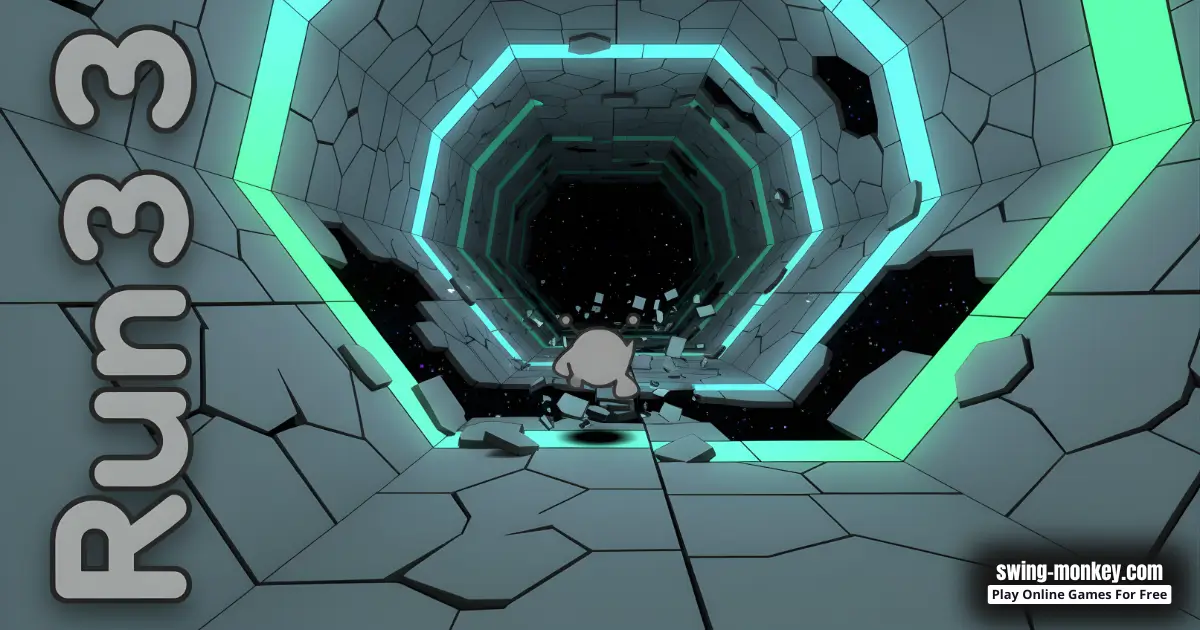
Run 3 is an online browser platform game set inside floating space tunnels. Your goal is to guide a small runner to the end of each tunnel without falling out into space. You run forward, jump over gaps, and rotate the tunnel to change which surface is safe to run on.
Developer: Joseph Cloutier, also known online as player_03. Run 3 became popular as an online game in 2014 and stayed famous because the levels are clever and replayable. If you want the genre name, Run 3 is a platform game. You can learn what a platform game is on Wikipedia here: https://en.wikipedia.org/wiki/Platform_game.
Quick example: if the middle lane has a big hole, rotate to a side wall before you reach it. The wall becomes your new floor, and you can keep moving instead of stopping and panicking.
Run 3 Gameplay
Run 3 gameplay feels like a mix of running, jumping, and puzzle-solving. Most tunnels are short, so you can learn fast. You move through a hollow tube, time your jumps, and choose where to run because different lanes can be safe or broken. This is why many players search for run 3 online when they want a quick game that still rewards skill.
The most important skill is rotation. Rotation is not only a rescue move when you are about to fall. It is also a strategy move. Sometimes the floor is safe but slow, while the wall is faster. Other times the ceiling has a clean path that skips a messy section. When you rotate at the right moment, the tunnel gives you a brand new route.
Here is the simple idea behind the gravity trick. Your runner always sticks to the surface that is "down" at that moment. When you rotate the tunnel, you are choosing a new "down" surface. That means you can turn a dangerous gap into a safe lane, as long as you rotate early enough to stay balanced.
- Look ahead for the next safe tile, not the hole.
- Pick a lane: floor, left wall, right wall, or sometimes the ceiling.
- Rotate early while you still have space to adjust your position.
- Jump from flat tiles and aim to land in the middle of the next tile.
Many players switch between two main ways to play. In a level progression style, you clear tunnels and discover new areas. In an endurance style (often called an infinite or endless challenge), you try to survive a long sequence of tunnels and train your consistency. Both styles teach the same core skills: calm timing, smart routes, and clean landings.
- You enter a new tunnel and notice three gaps close together.
- You rotate early to a side wall, then make two smaller jumps instead of one huge leap.
- You land on a flat tile, steady yourself for a split second, then jump again.
- You finish the tunnel and remember the safe path for next time.
Kids-friendly mindset: treat each tunnel like a tiny lesson. If you fall, you did not fail. You learned the danger spot, and now you can fix one thing. Often, the fix is simple: jump a little earlier, rotate a little sooner, or aim your landing toward the center of the tile.
Run 3 Levels, Modes, Characters, and Upgrades
Run 3 has many hand-crafted tunnels that slowly teach new tricks. Early levels help you learn basic jumping and rotation. Later levels mix thin platforms, tricky angles, and surprise gaps that force you to plan ahead. The difficulty rises in a fair way, because every hard level is still beatable with calm timing and smart routes.
Many versions include two big modes. Explore mode focuses on moving forward through levels and discovering new routes. Infinite mode focuses on surviving as long as possible while the game pulls from a large set of pre-made tunnels. Infinite play is great for practice, because you see many layouts and learn to react quickly.
- Explore mode: finish the tunnel first, then replay it and try a different lane for a shortcut.
- Infinite mode: rotate early, land in the middle of tiles, and avoid panic jumps to keep your streak alive.
- Practice plan: do three calm runs to learn, then do one faster run to test your new route.
Some versions also include unlockable characters (sometimes called runners). These runners can have different movement styles. One runner may feel steady on tiny tiles. Another may jump farther for wide gaps. If a level feels impossible with your current runner, switching characters can make the challenge feel fair again.
In some versions, you can also earn an in-game currency (often described as batteries) and spend it on upgrades or extras. Think of upgrades as optional goals. You can still enjoy Run 3 online by simply beating levels, but upgrades and achievements give you more reasons to replay and improve.
Mini example: a tunnel with wide gaps can feel easier with a longer-jump runner. A tunnel with tiny stepping stones can feel easier with a controlled runner that stays steady after landing.
Platform
You can play Run 3 in your web browser on desktop, laptop, Chromebook, tablet, or mobile, depending on your device and browser. Because it is a browser game, you do not need to install anything to start playing. If you want the smoothest experience, close extra tabs so the game can run at a steady speed.
How to Play Run 3
- Goal: reach the end of the tunnel without falling out.
- In endless play, goal: survive as long as possible and keep a clean rhythm.
- Look ahead and pick a landing spot before you jump.
- Rotate early to turn a wall into a safe floor when the path breaks.
- Choose safe routes first, then replay for shortcuts once you know the level.
- After a fall, replay with one change: earlier rotation, calmer speed, or safer landing.
Run 3 rewards smart choices more than wild speed. A clean rhythm looks like this: run, jump, land, steady, then jump again. If you chain panic jumps, you often land on edges, and the next jump becomes rushed. Calm rhythm is the secret to beating more Run 3 levels.
Beginner checklist for run 3 online (quick and simple):
- Start centered in the lane so you have room to move left or right.
- Keep your eyes one step ahead and look for the next safe tile.
- Rotate before the edge, not at the edge, so gravity changes feel smooth.
- Jump from flat ground and aim to land in the middle, not on corners.
- If a route feels too risky, try the wall lane or take the longer safe path.
Quick fixes when you get stuck: slow down, rotate earlier, and aim for the middle of the next tile. Small changes beat big stress.
Here is a kid-friendly step-by-step plan for hard levels:
- First run: go slow and learn where the first danger spot is.
- Second run: rotate earlier and aim for the middle of each landing tile.
- Third run: try a safer lane, like a wall path, instead of the broken middle.
- Fourth run: once you can finish, replay for a faster route if you want.
Common mistake: jumping the moment you see a gap. Better habit: line up your runner, pick the landing tile, then jump. When you focus on the landing, your timing becomes smoother and you fall less.
Another smart habit is to break a scary section into parts. If a tunnel has five gaps, tell yourself, "I only need to beat the first two." After that, your hands relax, and the last three often feel easier.
Run 3 Controls
Run 3 controls can vary slightly by version and device, but most browser versions use simple movement and jump inputs.
- Desktop: Arrow keys or WASD to move left and right, and Space (or Up) to jump.
- Mobile: Many versions show on-screen buttons or taps for moving and jumping.
If your jumps feel delayed on mobile, try turning off battery saver mode, closing other apps, or playing in landscape mode. On desktop, fullscreen mode (when available) can make gaps easier to read because you see more of the tunnel.
Run 3 Tips and Tricks
- Rotate early, not late. Give yourself space to adjust after gravity changes.
- Aim for the middle of each tile. Edge landings are risky and can cause wobble.
- Use the wall as a safety lane. When the floor is full of holes, the wall path can be cleaner.
- Make two small jumps instead of one huge jump. Look for tiny ledges as stepping stones.
- Practice the short hop. Small jumps help you land on tiny platforms without overshooting.
- Count your steps. If you fall at the same gap, notice how many steps you take before you jump.
- Do not chain panic jumps. After a landing, steady yourself for a split second before the next jump.
- Replay with one goal. For example: "I will only rotate on straight sections."
- Use safe flat areas like checkpoints. Reach a wide tile, then attempt the risky move.
- Switch runners when stuck. Different abilities can turn a hard level into a fair one.
- Train your look-ahead eyes. Watch the next safe tile, not your feet.
- Take a short reset. If you feel frustrated, pause for 30 seconds, then try again calmly.
Example play: you see a long gap followed by a tiny platform. Instead of rushing, you slow down, rotate to the wall early, do a short hop, land centered, then hop again. It looks slower, but it keeps you safe and helps you finish the level.
Mini drill for improvement: choose one medium level and beat it three times in a row without falling. This teaches calm rhythm. When rhythm becomes natural, harder tunnels feel less scary.
Common mistake: trying to win every tunnel on the first try. In Run 3 levels, the best players do a learning run first. They watch where the holes are, choose a safe lane, and rotate early. On the next run, they speed up and test a shortcut. Try this rule in Run 3 online: finish the level once with safety, then replay for style. Because this is a browser game, restarts are instant, so practice is quick. If you are stuck, record the danger spot in your head and change only one thing each attempt. Soon you will feel the rhythm and your jumps look smoother.
Run 3 Features
- Gravity-changing tunnel rotation that turns walls into floors and makes every level feel fresh.
- Skill-based platforming with quick restarts, so learning stays fun.
- Multiple play styles, including level progression and endless survival challenges.
- Many hand-made tunnels designed to teach new skills step by step.
- Unlockable characters that can change how you handle gaps and narrow paths.
- Optional achievements and upgrades that add goals for players who like collecting.
- Short levels that work for quick breaks, plus long sessions for players who want mastery.
- Replay value because you can find safer routes, faster routes, and clever shortcuts.
- Kid-friendly space theme with no scary content, just tricky jumps and smart choices.
Try this: after beating a tunnel, replay it once and test a different lane. You will start seeing how rotation creates new paths. That is one reason Run 3 online stays fun for a long time.
Run 3 Download
Run 3 is designed for online browser play, so you do not need to download anything to enjoy the game on this page. If you are looking for apps with a similar name, these store searches can help you explore options. Always check the publisher name, screenshots, and reviews before installing any app.
- Android search: Google Play
- iPhone and iPad search: App Store


Run 3 Unblocked
You do not need to search for "Run 3 unblocked" because our website does not block access to the browser version. If a school or work network blocks games, that is usually a network rule. The best choice is to follow the rules and play Run 3 online during free time at home or when you are allowed.
Helpful idea: bookmark the play page so you can open it quickly when you have time to play. A bookmark is simpler than searching again and again.
Run 3 Github
No need to search for Run 3 Github. You can play the browser game directly on our website here: https://swing-monkey.com/game/run-3.
No need to search for Run 3 unblocked 76, Run 3 unblocked 66, Run 3 unblocked iOS, Run 3 GitHub, Run 3 Poki, Run 3 Cool Math Games, Run 3 Math Playground, Run 3 Hooda Math, Run 3 Crazy Games, Run 3 Classroom 6x, or Run 3 2 Player Games.
The updated, fully working version is available right here onSwingMonkey and you can play for free anytime on most devices and networks.
Why You'll Love It
- It feels like a space obstacle course where every win is earned with skill.
- It is a brainy runner. You win by thinking about routes, not only by going fast.
- Small improvements matter, because one better jump can change the whole run.
- It stays fresh, since rotating the tunnel makes the same level feel different.
- It is easy to start but satisfying to master, so it fits beginners and pros.
- Replays feel rewarding because you can beat your own best path, not just finish.
Fun moment: when you finally rotate early, land cleanly, and glide through a level that used to stop you, it feels amazing. That is the magic of Run 3 gameplay, you can feel yourself improving in a real, simple way.
Similar Games to Run 3
If you like Run 3, you will probably enjoy other fast arcade and skill games that focus on timing, momentum, and quick decisions. Here are a few popular picks that many Run 3 fans also search for:
- Swing Monkey
- Stickman Hook
- Slope
- Run 1
- Run 2
- Tunnel Rush
- OvO
- Vex 3
- Vex 4
Want more? Browse our Arcade Games list to find new browser games that feel quick, bright, and fun.
Run 3 Details
Requirements
To play this game, all you need is a computer, an internet connection, and a web browser. No downloads are required!
Release Date
September 30, 2014
Developer
Run 3 was developed by Joseph Cloutier Aka Player_03
Platform
Web browser (desktop and mobile)
Technology
Built using HTML5 technology
FAQ
Is Run 3 free to play?
Yes. You can play Run 3 online for free in your browser on our website. Just open the page and start running.
Is "run 3 online" the same as Run 3?
Yes. People often say "run 3 online" to mean the browser version you can play right away. The core game is the same idea: run, jump, rotate, and stay inside the tunnel.
Is Run 3 safe for kids?
Run 3 is kid-friendly. It is focused on movement and timing with a simple space theme. There are no scary scenes, and the challenge is about skill and practice.
Can I play Run 3 on mobile?
Many players can play Run 3 in a mobile browser. If the controls feel small, try landscape mode, close other apps, and lower your browser zoom so you can see gaps more clearly.
Can I play Run 3 on a Chromebook?
Often yes, as long as your Chromebook has a modern browser. For smoother play, close extra tabs and avoid heavy background apps while you run.
Do I need to download anything?
No. The Run 3 browser game is made for online play. You can start instantly on the play page with no install.
Does Run 3 have levels or is it endless?
It can be both. Many versions include a level-based mode where you progress through tunnels, plus an endless style challenge where you try to survive for a long time.
What is Explore Mode in Run 3?
Explore Mode is the level journey. You finish tunnels, unlock new paths, and learn new tricks step by step. It is great for beginners because you can replay a level, test a safer route, and build skill without pressure.
What is Infinite Mode in Run 3?
Infinite Mode is the endurance challenge. The game sends you through a long mix of tunnels, and you try to survive as long as possible. It is perfect for practice because it trains your rhythm, fast decisions, and calm rotation.
How do I unlock new characters?
In many versions, you unlock runners by progressing through levels and earning rewards. Each runner can feel different, so if a jump seems too wide or too tight, switching characters can make the same tunnel easier to finish.
What is the best beginner tip for Run 3?
Rotate early and aim for centered landings. Early rotation keeps you safe, and centered landings make your next jump easier.
Why do I keep falling even when I jump?
Usually it is timing or landing angle. Try jumping a little earlier and landing on a flat tile, not on the edge. Also, slow down before the jump so you can aim.
What is the easiest way to handle huge gaps?
Look for another route by rotating onto a wall. Many tunnels hide safer paths on the side lanes, with smaller gaps you can chain together.
Are there different characters?
Many versions include unlockable runners with different abilities. If one character struggles on a level, another might make the jump feel smoother or the landings feel steadier.
What are upgrades or batteries?
Some versions include an in-game currency often described as batteries and a shop with upgrades. These extras are optional and mainly add goals and replay fun.
Does Run 3 save progress?
Some browser versions save progress on your device, but it can depend on browser settings. If progress matters, try playing on the same browser and avoid clearing site data.
Can I play Run 3 offline?
The version on this page is made for online browser play. If you need offline play, you would need a separate app or installed version. For most players, the easiest option is to play Run 3 online in your browser.
What should I do if Run 3 feels laggy?
Close extra tabs, refresh the page, and turn off heavy extensions that block scripts. A smoother frame rate makes jumps easier to time.
Can I play Run 3 at school?
Our site does not block the game, but schools may have their own rules and filters. Always follow your teacher and school policy, and play during approved break time.
Conclusion
Run 3 is a smart, fast, and kid-friendly browser game that turns simple running into a cool gravity puzzle. You learn to rotate tunnels, pick safe routes, and master clean landings. The more you practice, the more fun it gets, because you start spotting shortcuts and moving with calm rhythm.
Ready to run? Play Run 3 online now on our website: https://swing-monkey.com/game/run-3. Then explore more quick challenges in our Arcade Games category.